How to Crop PDF Pages and Remove White Margins
4 min read
Trim PDF margins by millimetres or auto-detect the content, apply to all, odd, even or chosen pages, and learn why cropping does not delete hidden content.
Wide white margins make a document hard to read on a phone and waste paper. Scanned pages often have dark edges or a strip of scanner shadow. Crop PDF trims the page to the part you want, either by dragging the crop box on the preview or by entering exact margins.
Before you use it for anything sensitive, read the section on what cropping actually changes. It hides content outside the box; it does not erase it.
Step by step
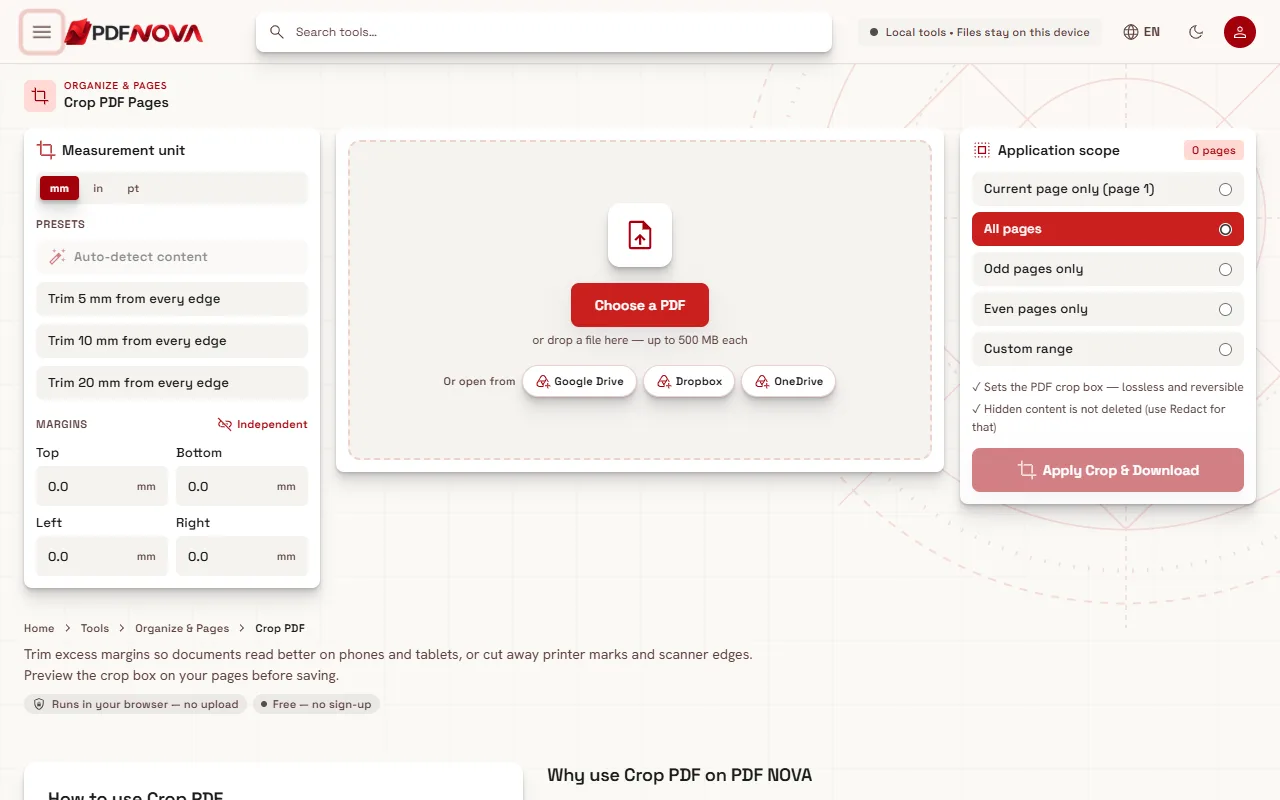
- Open Crop PDF and select your file with Choose a PDF, or drop it onto the page.
- Choose the Measurement unit: mm, in or pt.
- Set the crop. Drag the edges of the box on the page preview, type values for Top, Bottom, Left and Right under Margins, or use a preset such as Trim 5 mm from every edge. Auto-detect content finds the content on the page and crops around it.
- Under Application scope choose which pages to crop.
- Select Apply Crop & Download.
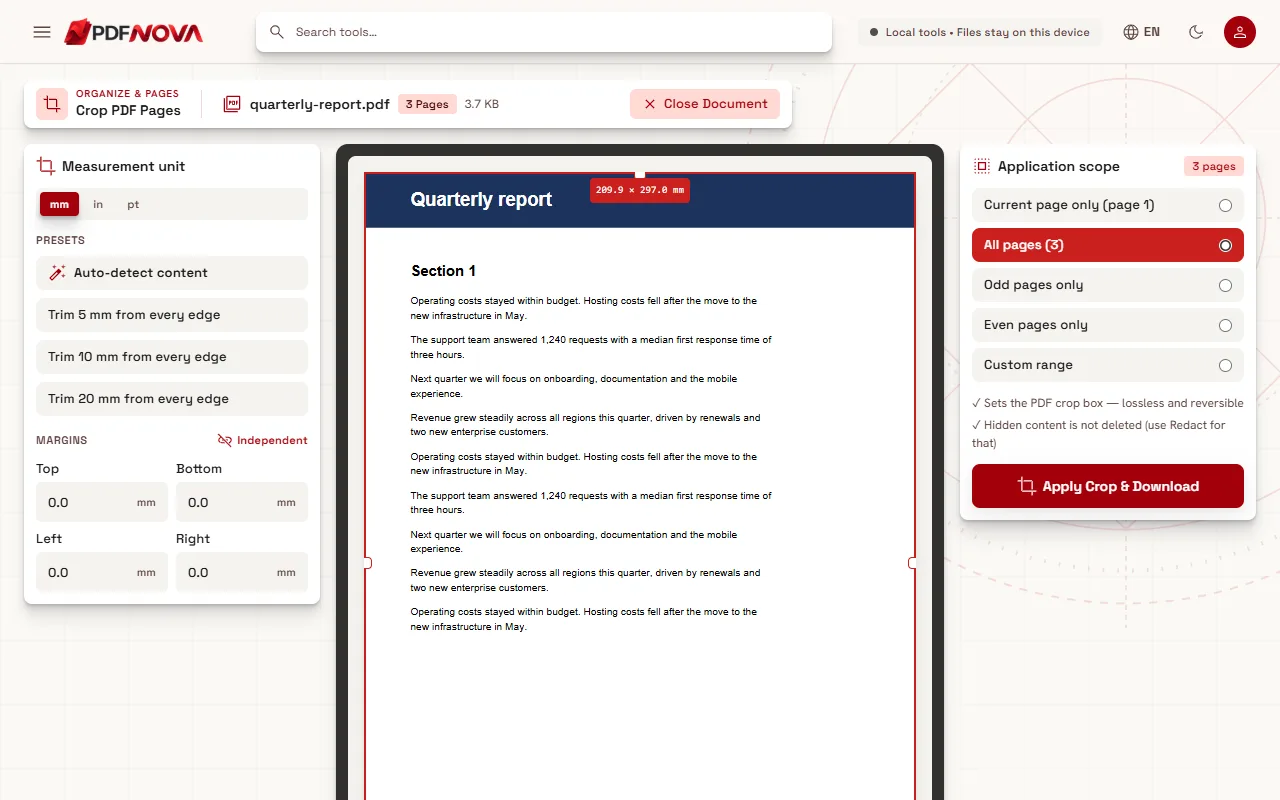
If you forget to set a margin, the page asks you to drag the edges of the box or enter values. The file is saved with "_cropped" added to its name.
Margins: linked or independent
Next to the margin fields you can switch between Linked and Independent. Linked changes all four sides together, which is quick for an even border. Independent lets you take more off one side, for example a wide binding margin on the left or a scanner edge at the bottom.
Auto-detect content looks at the current page. If it cannot find anything, it says "No content found on this page to crop around." Reset bounds puts the box back to the full page.
Which pages to crop
Application scope offers these choices:
- Current page only, which is the page shown in the preview.
- All pages, with the page count shown.
- Odd pages only or Even pages only, useful for book scans where the margins alternate.
- Custom range, where you type pages such as 1-8, 12 in the Pages field.
For a scanned book, crop odd and even pages in two passes with different left and right values, because the binding sits on opposite sides.
What cropping really does
The panel states two things, and they matter:
- It "sets the PDF crop box", which is lossless and reversible.
- "Hidden content is not deleted (use Redact for that)."
A PDF page has a crop box that defines the visible area. This tool changes that box. The text, images and drawings outside it are still inside the file, only not displayed. Some software can show or recover them, for example by resetting the crop box or by extracting text.
That means cropping is fine for readability and tidy-up, but it is not for hiding information. If the area you cut contains a name, number, signature or anything private, do not rely on crop. Use Redact PDF, which removes content permanently, as explained in redacting a PDF permanently. Hidden data about the file itself, such as author and dates, is a different matter: see removing PDF metadata.
The tool writes a new file and leaves your original alone, so you can always start again from it.
Crop or resize?
Crop changes the visible area of a page, so the page gets smaller and the content stays at its original size. Resize PDF Pages changes the page size to A4, Letter, Legal and others and scales the content to fit. Use Crop to remove empty space, and Resize when a document has to match a paper size. A common routine for scans is to crop the edges and then resize to A4.
Practical tips
- If every file has similar margins, merge them first and crop once with All pages.
- If a scan is not searchable, crop first and then run OCR: making a scanned PDF searchable.
- A smaller page does not make the file lighter, because the hidden content remains in the file. If size is the goal, see reducing a PDF's size for email or compressing without losing quality.
- Check the output on several pages, because a box that suits page 1 may cut into content on another page.
Privacy and cost
Crop PDF is free, needs no account and runs in your browser, so the file is not uploaded. See whether online PDF tools are safe for more.
FAQ
Does Crop PDF delete what I cut off?
No. It sets the crop box, so the content outside is hidden but remains in the file. Use Redact PDF to remove content permanently.
Can I undo a crop?
The change is reversible in the file itself, and your original is unchanged, so you can always start again from it.
Can I crop only some pages?
Yes. Choose the current page, odd, even or a custom range under Application scope.