Reduce PDF Size for Email: Fit Any Attachment Limit
5 min read
A PDF too large to email? Check your mail service's limit, compress the file, split it if needed, or share a link instead. A practical decision path.
You attach a PDF, press send, and the mail service refuses it: the file is over the attachment limit. The fix is usually quick, but the best fix depends on how far over the limit you are and what is making the file heavy.
This guide gives you a decision path: find the limit, compress the file with Compress PDF, split it with Split PDF if it is still too big, and share a link when neither is enough. If you want to understand the quality levels in detail, the companion guide on compressing a PDF without losing quality goes deeper. This one is about getting under a limit.
Know the limit first
At the time of writing, Gmail accepts attachments up to 25 MB per message and Outlook.com up to 20 MB. Company mail servers, school systems and web forms often set their own, lower limits, and these numbers can change, so check your provider's help page if it matters.
Two details catch people out. First, the limit applies to the whole message, not to each file. Second, attachments are encoded for transport, which makes them somewhat larger than the file on your disk, so a file just under the limit can still be rejected. Aim for clearly below it rather than exactly at it.
The decision path
- Compress the file. Most oversized PDFs are oversized because of images, and this step often solves the problem alone.
- If it is still too big, split it into parts that each fit, and send several messages.
- If the recipient needs one file, or the parts are still large, upload it to a drive or file-sharing service and send a link instead.
What makes a PDF heavy
A PDF is made of text, fonts, vector drawings and images. Text and vectors are tiny. The weight almost always comes from pictures:
- Scans. Every page is a photo of paper, often stored at a high resolution. A 20-page scan can be larger than a 500-page text document.
- Photos and screenshots pasted into a document, especially full-resolution phone photos.
- Many embedded fonts, which matter less but add up.
The Size breakdown panel in Compress PDF shows how much of your file is Images, Fonts, and Text, vectors and structure, so you can see right away whether compression has much to work with.
Step by step: compress for email
- Open Compress PDF and choose your PDF, or drop it onto the page.
- Check the Size breakdown. If images are most of the file, expect a good saving.
- Under the target optimization presets, start with Recommended Balance. If the result is still above your limit, switch to Maximum Compression.
- Look at the Visual comparison slider to see that page 1 is still readable.
- Select Compress & Download.
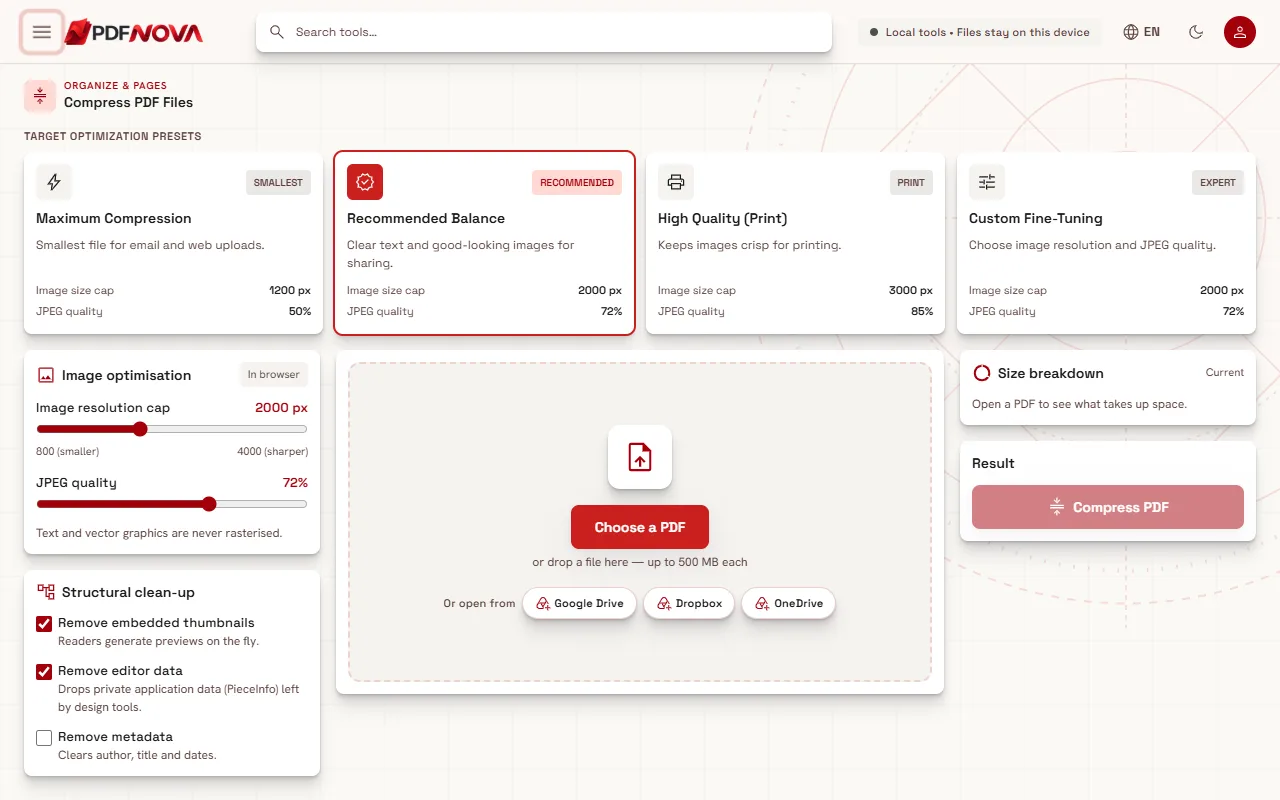
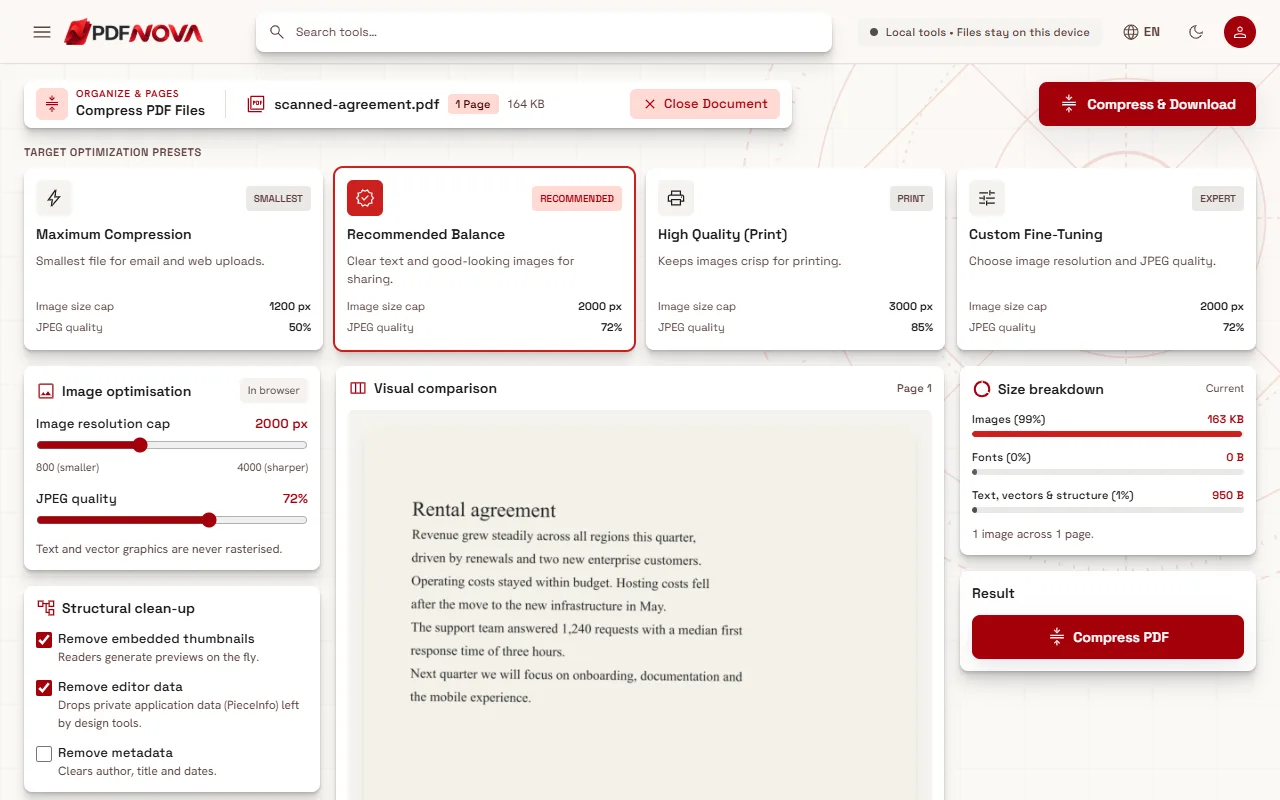
Choose Maximum Compression when email is the only goal. It is the smallest preset and meant for email and web uploads. If the document will also be printed on paper, keep the original for that and send the smaller copy.
Check the result before you send
The Result panel shows the original size, the new size and the percentage saved. Compare the new size with the limit you found, leaving some margin.
Then open the downloaded file and look at it as the recipient will: zoom in on small text, a stamp, a signature or a photo. Image compression is lossy, so fine detail may be softer. Your original file is not changed, so you can run the compression again with a different setting.
If the tool shows This PDF is already well optimised, it could not make the file smaller with those settings and did not create a new file. Try Maximum Compression or a lower resolution cap under Custom Fine-Tuning, or move on to the next step in the decision path.
Still too big: split it
Some files will not fit however much you compress them, such as a long scanned report. Use Split PDF to cut it into parts. Under Split Strategy you can choose Ranges, Every N pages, Burst (every page its own PDF) or Odd / Even. The split downloads as a ZIP file, so unzip it and attach the parts to separate messages, ideally named so the order is obvious. The guide on splitting a PDF and extracting pages covers the options.
Compress first and split second: a compressed file may need fewer parts, or none.
Or send a link instead
When the recipient really needs a single large file, a link is often the better choice. Upload the PDF to a drive or file-sharing service you trust and send the link. PDF NOVA does not host shared files for you, so use your own storage. Before sharing a document that contains personal data, consider removing hidden details with Remove PDF Metadata or adding a password, as described in protecting a PDF with a password.
Reduce the size at the source
If you create the PDF yourself, a few habits keep it small from the start: scan at a moderate resolution instead of the highest setting, resize photos before inserting them, and leave out pages you do not need with Delete PDF Pages. Combining files? Merge them in order first and compress the final result once.
Privacy and cost
Compress PDF runs in your browser. The file is processed on your device and nothing is uploaded. It is free to use without an account, as is Split PDF. For more background, see whether online PDF tools are safe.
FAQ
What is the maximum attachment size in Gmail and Outlook?
At the time of writing, 25 MB for Gmail and 20 MB for Outlook.com. Check your own provider, since limits change and company servers are often stricter.
Will compression make my scan unreadable?
Maximum Compression lowers image resolution and quality, so a scan becomes softer. Check the comparison slider and the downloaded file. If text is no longer legible, use Recommended Balance and split the file instead.
Is the compressed PDF a new file?
Yes. Your original stays unchanged on your device.