Change a Date or Amount in a PDF Invoice
5 min read
Update a due date, a client name or a price in a PDF invoice or quote without rebuilding it. Same font and layout, plus the checks to make before you send it.
The quote went out with last month's price. The invoice says the payment is due on the 6th when you agreed on the 20th. The client's company name has a letter missing. The PDF came from an invoicing tool you no longer use, or from a template someone else made, so there is nothing to "edit and export again".
You can change these details directly in the PDF. Open it in Edit PDF Text, click the date, the name or the amount, type the new value and download. PDF NOVA rewrites the characters in the file with the font, size and spacing that are already there, so the new date sits exactly where the old one was. It is free, needs no account, and the file stays on your device.
One point before you start: only change documents you are entitled to change, and if an invoice has already been issued and recorded, read the section on corrected invoices below.
Step by step: change a date in a PDF invoice
- Open Edit PDF Text and choose the invoice or quote.
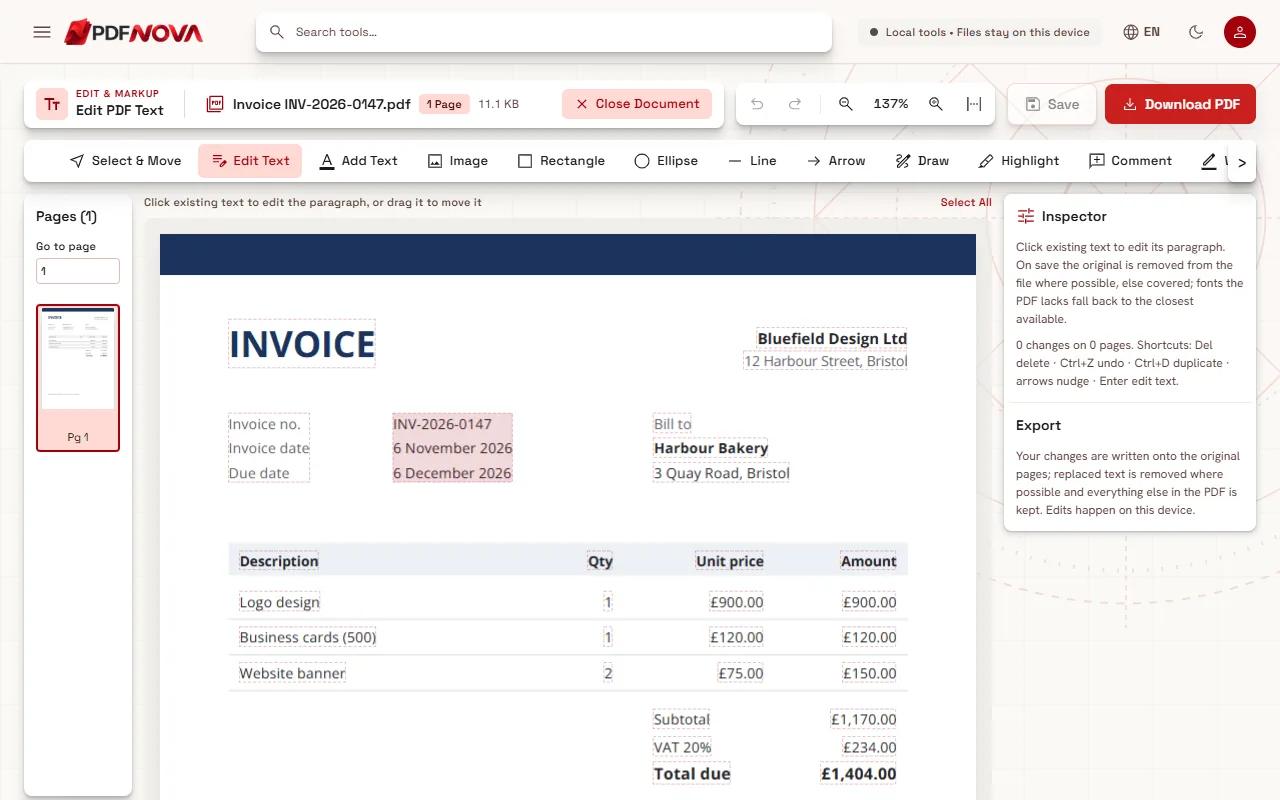
- Keep Edit Text selected in the tool row. Every piece of text the editor can change gets a thin dashed outline.
- Click the date. The line opens for editing and the Inspector shows its original font, for example "Original font: Open Sans".
- Select only the part that changes, such as "6", and type the new value, such as "20". The month and year are kept as they are.
- Do the same for every other detail, then select Download PDF.
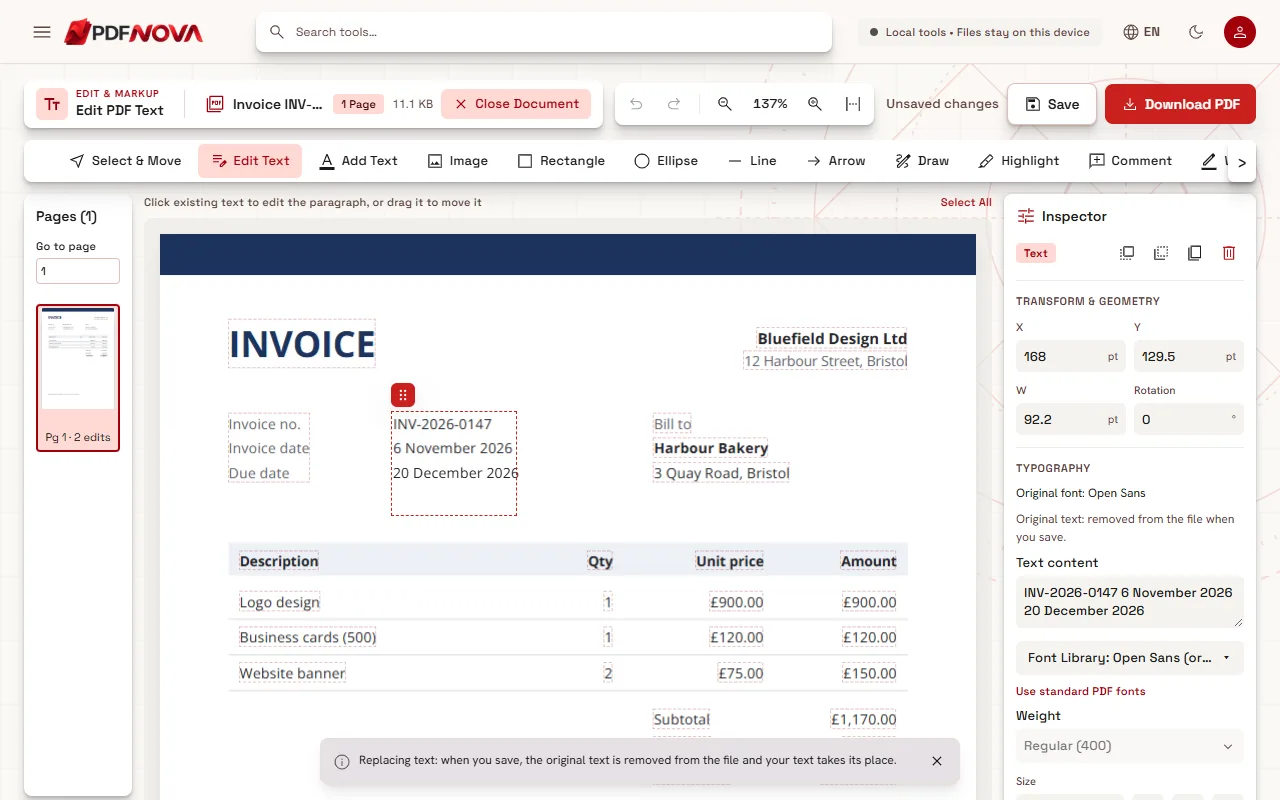
The downloaded copy gets "_edited" in its name. Your original file is not changed.
Changing an amount: the editor does not do the maths
A PDF invoice is a picture made of text, not a spreadsheet. When you change a unit price, nothing else updates by itself: the line amount, the subtotal, the tax and the total are separate pieces of text. Change each one, then check the arithmetic on paper or with a calculator before you send the file.
The good news is that digits usually have the same width, so replacing "900.00" with "950.00" moves nothing: the new figures land exactly in the boxes of the old ones. When an amount gets longer, for example from 950 to 1,050, the extra character has to go somewhere. In a column of right-aligned amounts, the edited value grows towards the right, so it can stick out past the column edge. This is a known limit. To keep the column straight, select the amount afterwards with Select & Move and drag it back into line, or nudge it with the arrow keys.
Bold totals are often written in a separate bold font that contains very few digits. If the new total needs a digit that font does not have, the editor uses the closest matching font for that digit and says so in the Inspector, so you know to look at that line twice.
Names, addresses and references
Client names and addresses work like any other text: click, correct, done. Invoice numbers too, but think twice before changing one (see below). If the new name contains letters that appear nowhere else in the document, the font in the file may not include them. The editor then keeps the original letters it has, writes only the missing ones in the closest matching font, and tells you which characters and which font in the Inspector. Why that happens is explained in why the font changes when you edit a PDF.
Is the old value still in the file?
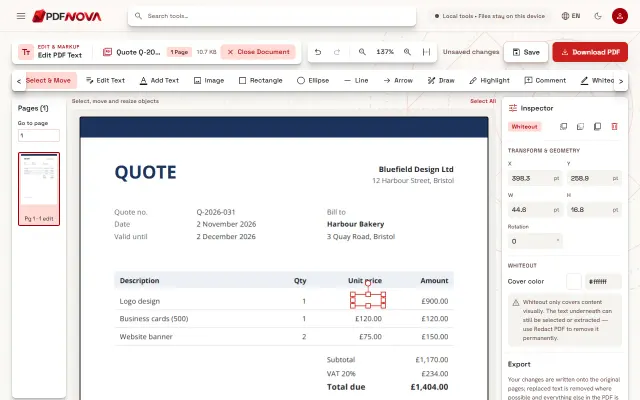
Not in the normal case. When you save, the old date or price is removed from the page content and the new one takes its place. Search the downloaded file for the old value (Ctrl+F in your PDF reader): it should not be found. This matters more than it looks. A white box over a price hides it on screen, but the old figure stays in the file, where anyone can find it by searching or copying. Editing versus covering with a white box shows the difference in detail.
If the editor cannot rewrite a piece of text safely, it covers it instead and labels it "Covered, original kept underneath" in the Inspector before you save, with the reason.
Before you send it: corrected invoices and e-invoices
Editing a quote or a draft invoice before it goes out is ordinary work. An invoice that has already been issued is different: in many countries, tax rules expect you to correct it with a credit note or a new invoice with its own number, not by changing the original. Check the rules where you work, or ask your accountant, before you edit an issued invoice.
Some invoices are also e-invoices (for example Factur-X or ZUGFeRD): next to the visible page they carry the same data as an XML file inside the PDF. Editing the visible text does not change that attached data, so the two would no longer match. Issue a corrected e-invoice from your invoicing software instead.
Limits to know
- Scanned or photographed invoices (a photo saved inside a PDF works the same way as a scan). The editor reads the lines on your device (OCR): click the date or amount and retype it. Check the figure you change, because OCR can misread, and the old value stays in the picture underneath. For confidential details use Redact PDF.
- Signed PDFs: the editor warns that saving any change invalidates the digital signature.
- Protected files: if the PDF asks for a password, remove it with Unlock PDF first, if you are allowed to.
- Right-aligned amounts that get longer grow to the right, as described above.
Privacy
Invoices hold bank details, addresses and prices. Edit PDF Text processes the file in your browser: it is not uploaded, so there is nothing stored on a server and nothing to delete afterwards.
FAQ
Can I change the currency symbol?
Yes, if the document's font contains the new symbol, or the editor finds a matching font that does; the Inspector tells you which font is used.
The date is inside a table cell. Will the table move?
No. The cell's text is rewritten where it is, inside its own borders, and lines, fills and other cells are kept.
Can I add a line to the invoice?
You can add new text with Add Text and choose the invoice's font in the Font Library, under "Document fonts"; each entry says which face will actually be used for new text. For several new lines with totals, regenerating the invoice in your invoicing tool is usually cleaner.
Is it free?
Yes. Editing text is free, needs no account and adds no watermark. To fix a simple spelling mistake instead, see how to fix a typo in a PDF without the Word file.